Host.al Improves Its Free DNS Manager
The number 1 .al domain registrar.
Host.al's free DNS Manager now keeps your existing records, adds search and filters, and records a change history for every zone.
Here is what's new.
24 November 2026

At Host.al, DNS hosting is free. Every domain in your account can use our nameservers, ns1.host.al and ns2.host.al, and you manage its records yourself in the DNS Manager at my.host.al, at no extra cost.
This week we made the DNS Manager safer and easier to use. Here is what’s new.
At a glance
- Fix: a new record no longer replaces the records already there.
- New: search, and a filter by record type.
- New: a change history for every zone, with the date, time and who made each change.
- Improved: a clearer list of your domains, with the status of each one.
New records no longer remove old ones
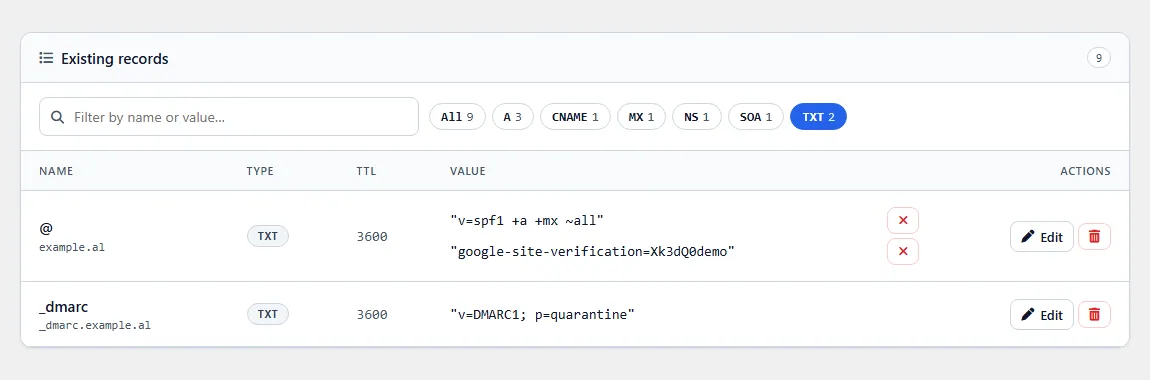
A domain often has several TXT records on the same name: an SPF record for email, plus verification codes from Google, Microsoft or other services. Until now, adding a new TXT record could replace the existing ones. Adding a Google verification code, for example, could remove your SPF record.
This is fixed. A new record is added next to the existing ones, for every record type, including MX and A. When a name has several values, each one has its own × button, so you can remove one value without touching the others.
⚠️ Check your SPF record. If you added a TXT record (such as a verification code) in the last few weeks, open your zone and make sure your v=spf1 record is still there. If it is missing, add it again with Add record. Without SPF, your emails are more likely to land in spam.
Find the record you need
Type in the search box to filter by name or value, for example spf, _dmarc or an IP address. Click a type, such as TXT, to show only those records. Each type shows how many records it has.
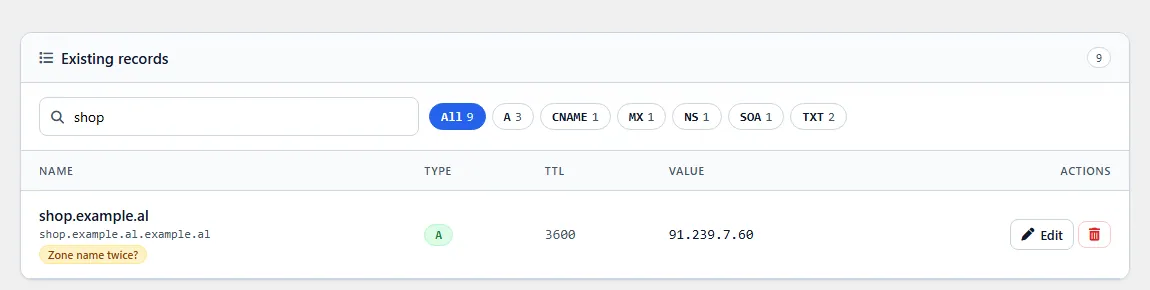
The DNS Manager also marks records whose name contains the domain twice, such as shop.example.al.example.al. This usually happens when the full name is typed into the Name field, which already adds your domain. If you see the Zone name twice? label, add the record again with only the short name (shop) and delete the old one.
See who changed what, and when
Every zone now has a Change history at the bottom of its records page. Each entry shows the date and time, who made the change, the record, and its value before and after:
- your own changes show your name, email and IP address;
- changes made by our team show as Host.al support;
- zones created automatically when you register a domain show as Automatic (system).
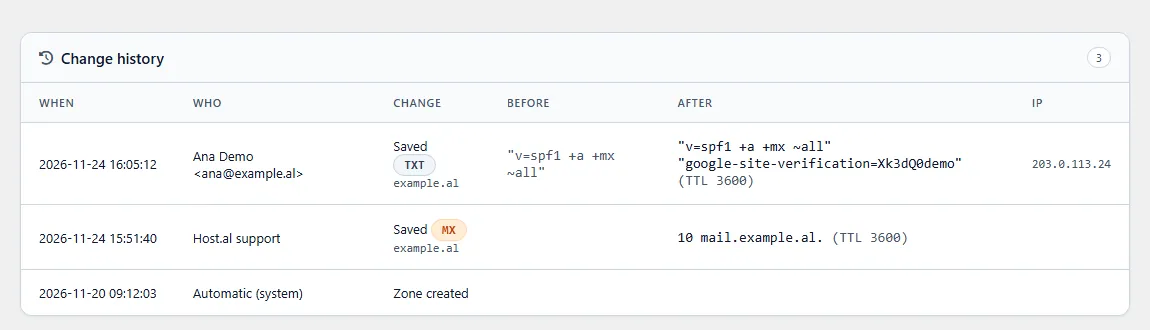
The history keeps the old value, so you can always put back a record that was changed by mistake. It starts from this update.
A clearer list of your domains
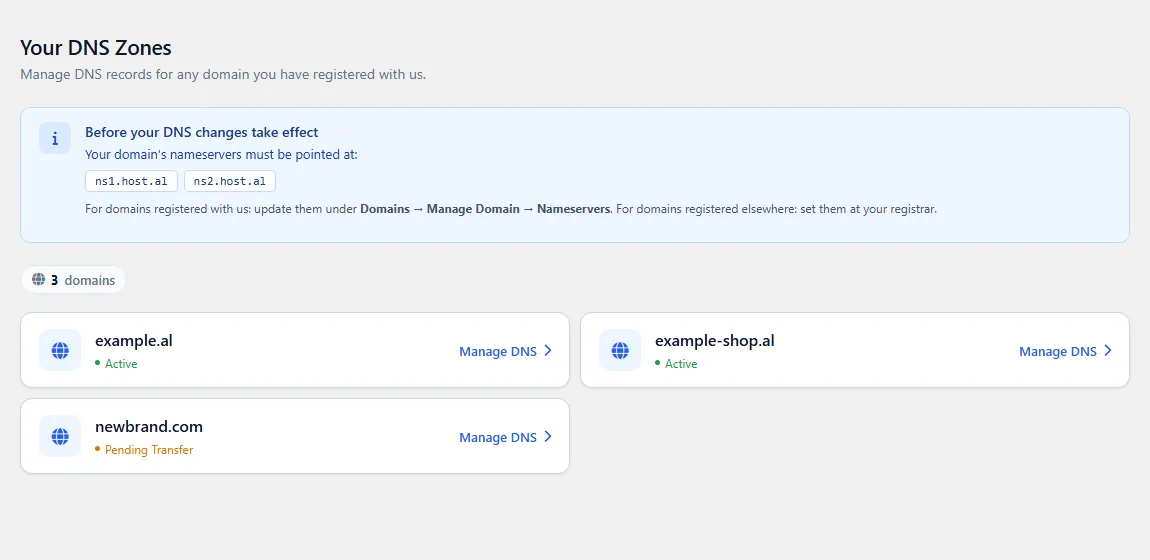
The Domains → DNS Manager page shows your domains as cards, with the status of each one and a Manage DNS link. At the top you also see the nameservers your domain needs to use.
How to use it
- Log in to my.host.al.
- Open Domains → DNS Manager.
- Choose a domain and click Manage DNS.
For your changes to work, the domain must use the nameservers ns1.host.al and ns2.host.al. For domains registered with Host.al, set them under Domains → Manage Domain → Nameservers.
Questions, or need help putting a record back? Open a ticket from Support → Open Ticket in my.host.al, or see our DNS questions.
Screenshots use the example domain example.al.

Empower your business with Host.al
Recommended posts

A New Milestone in Information Security We are proud to announce that Host.al has successfully achieved ISO 27001:2022 certification, the gold standard for information security management systems worldwide...


Many businesses in Kosovo serve customers in Kosovo, Albania and the diaspora at the same time...